
The biggest obstacle to switching from Windows to Linux rarely has anything to do with Linux.
It’s usually one stubborn legacy application.
An accounting tool written fifteen years ago.
A proprietary medical billing system.
A niche industry database that only runs on Windows.
For many organizations, that single dependency locks the entire company into a full Windows environment — even when security teams know the attack surface is larger than necessary.
The hybrid Linux Windows VM model solves this problem without forcing a risky, all-or-nothing migration.
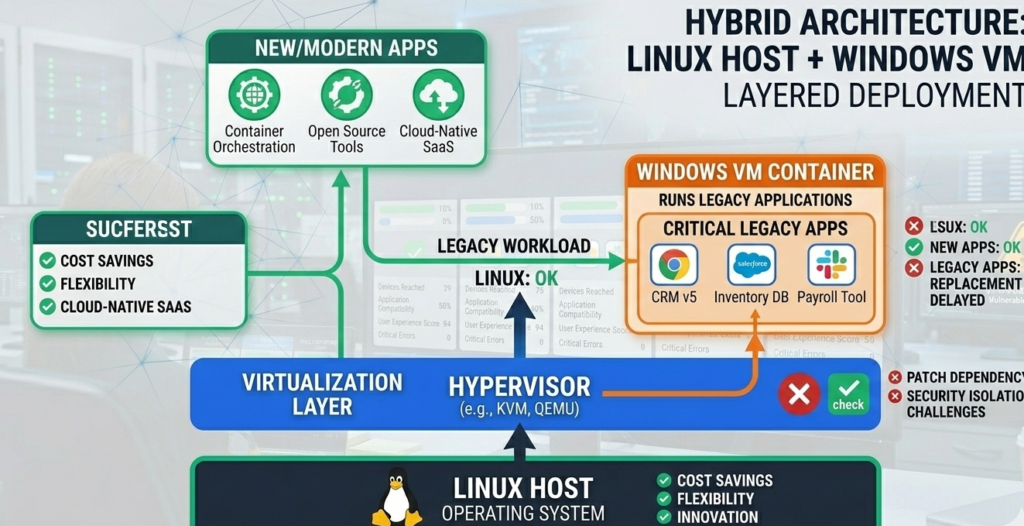
Instead of running everything on Windows, the architecture separates responsibilities:
- Linux becomes the daily-use operating system
- Windows runs inside a virtual machine only when required
This approach dramatically reduces exposure to common attack vectors like browser exploits, malicious downloads, and email-borne malware.
More importantly, it contains legacy risk inside a controlled boundary instead of letting it permeate the entire workstation.
Organizations that adopt this model gain the stability and security posture of Linux while maintaining compatibility with the Windows software they still depend on.
What follows is a practitioner’s breakdown of how the architecture works — including isolation rules, networking decisions, and migration steps that determine whether the model improves security or accidentally introduces new weaknesses.
Why One Legacy Application Blocks Entire OS Migrations
Many Linux adoption conversations collapse at the same moment.
An IT leader proposes moving workstations to Linux.
Someone raises a hand and says:
“But we have that application.”
Suddenly the migration discussion stops.
The Hidden Cost of Legacy Software Lock-In
Legacy software rarely stays isolated. Over time it quietly dictates infrastructure decisions across the organization:
- Entire desktops remain Windows-based
- Security patching must follow Microsoft cycles
- Browser-based attacks target the OS directly
- Malware persistence becomes easier
The organization ends up accepting the full Windows attack surface simply to preserve compatibility with a small number of tools.
Why Rewriting or Replacing the App Often Fails
In theory, the best solution is replacing legacy software.
In practice, organizations hesitate because:
- Replacement costs can be high
- Industry-specific software may have no equivalent
- Data migration risks business disruption
- Users resist workflow changes
So the dependency persists — sometimes for decades.
The Hybrid Model Changes the Framing
Instead of asking:
“Can we eliminate the legacy app?”
The hybrid architecture asks:
“Can we isolate the legacy app?”
That reframing unlocks a practical path forward.
Takeaway: If one Windows application blocks Linux adoption, the real problem isn’t compatibility — it’s architecture.
How the Hybrid Linux Windows VM Architecture Works
At its core, the hybrid design is simple:
Linux runs on the physical machine. Windows runs inside a virtual machine.
But the security benefit comes from how responsibilities are separated.
Layer 1 — Linux Host (Primary Work Environment)
The Linux host handles:
- Web browsing
- Email clients
- document editing
- messaging tools
- developer tools
- most productivity software
Because Linux uses strict user privilege separation, malware has a much harder time achieving persistence compared to typical Windows environments.
Layer 2 — Windows Virtual Machine (Legacy Compatibility Zone)
The Windows VM exists for a narrow purpose:
- running legacy applications
- accessing required Windows-only software
- occasional compatibility workflows
The VM is not used for daily browsing or email.
This design dramatically reduces risk because:
- malware inside the VM cannot easily reach the host
- persistence across reboots becomes harder
- snapshots allow fast rollback
Layer 3 — Virtualization Boundary
The virtualization layer acts as a containment wall between systems.
If malware affects the VM:
- it remains inside the virtual environment
- snapshots can restore a clean state
- the Linux host remains unaffected
Takeaway: The hybrid model works because it moves Windows from “primary environment” to “contained compatibility layer.”
Why a Linux Host Dramatically Reduces Attack Surface
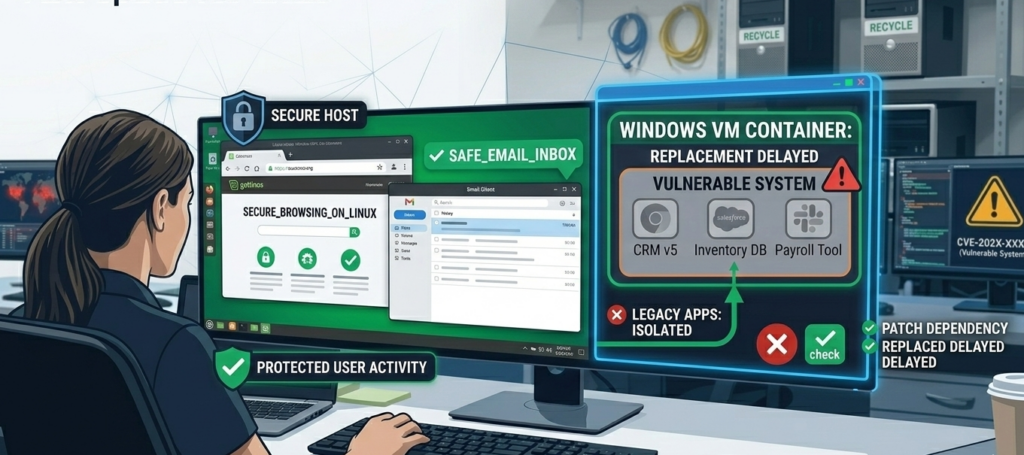
Most endpoint compromises begin in predictable places.
- web browsers
- email attachments
- malicious downloads
- drive-by website exploits
When these activities occur on Windows, attackers often gain access to the entire system.
Linux changes the equation.
Strong Default Privilege Boundaries
Linux environments rely heavily on user privilege separation and permission control.
Applications run with limited privileges unless explicitly elevated.
That means malware launched through a browser typically cannot modify system files or install persistent services without administrative access.
Reduced Malware Targeting
The majority of mass-distributed malware targets Windows.
Linux systems are not immune, but the attack ecosystem is smaller because:
- market share differs
- privilege models differ
- endpoint protection assumptions differ
Operational Stability
Linux also brings operational advantages:
- faster patch cycles
- predictable package management
- transparent update processes
Organizations that shift daily work to Linux often discover something unexpected:
Security incidents tied to browsing and email drop significantly.
Takeaway: Moving browsing and communication to Linux removes the most common entry points attackers rely on.
Why a Windows VM Limits Persistence and Lateral Movement
Running Windows inside a VM doesn’t magically eliminate risk.
What it does is change the blast radius.
Contained Persistence
In traditional Windows environments, malware often persists through:
- registry modifications
- scheduled tasks
- system services
Inside a VM, administrators can reset the entire operating system state through snapshots.
If the environment becomes suspicious:
- Revert to a known clean snapshot
- Restart the VM
- Resume work safely
Isolation From the Host
Virtualization platforms enforce separation between:
- guest OS memory
- host filesystem
- device drivers
While vulnerabilities occasionally appear, guest-to-host escapes remain rare and heavily scrutinized in security research.
Reduced Lateral Movement
Attackers typically expand access by moving across the network.
A properly configured VM can:
- limit outbound connections
- restrict network segments
- disable unnecessary ports
That containment significantly reduces the likelihood of an attacker reaching other systems.
Takeaway: The VM’s primary security advantage is rapid recovery and controlled containment, not absolute immunity.
The Networking Mistake That Breaks Most Hybrid Deployments
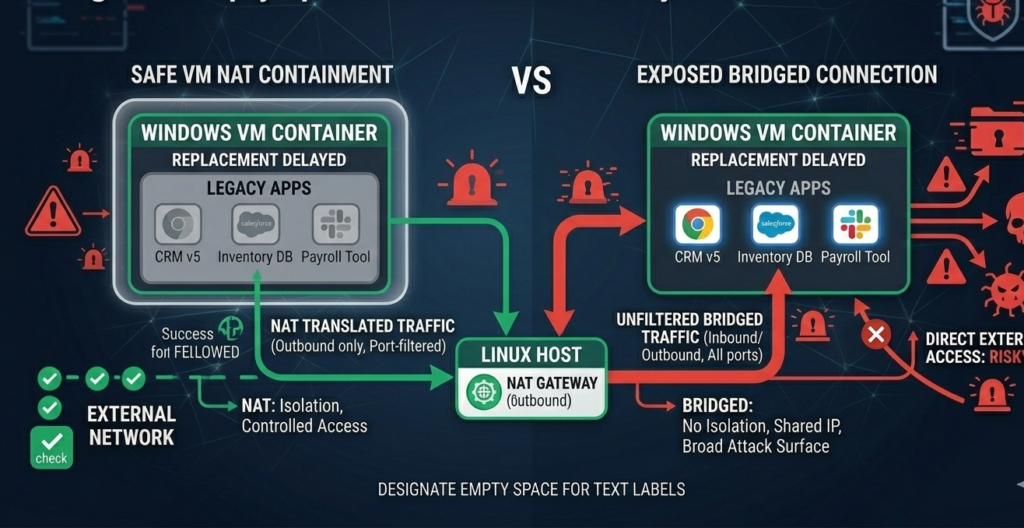
A hybrid Linux + Windows VM environment can accidentally undermine its own security.
The most common cause:
Improper network and file-sharing design.
Risky Default Configuration
Many virtualization setups use bridged networking, which places the VM directly on the local network.
This eliminates the containment boundary.
The Windows VM effectively becomes another full network participant.
Safer Networking Approach
A safer configuration often includes:
- NAT networking instead of bridged mode
- firewall rules restricting outbound traffic
- no inbound connections to the VM
This design ensures the VM behaves more like a contained client rather than a full server.
Shared Folder Pitfalls
Shared folders are convenient but can become a hidden vulnerability.
Common mistakes include:
- full access to host directories
- automatic mounting on boot
- write permissions across systems
Best practice limits shared folders to specific project directories only, with clear permission rules.
Takeaway: Networking design determines whether the VM acts as a secure container or just another vulnerable workstation.
A Practical Migration Path From Windows to the Hybrid Model
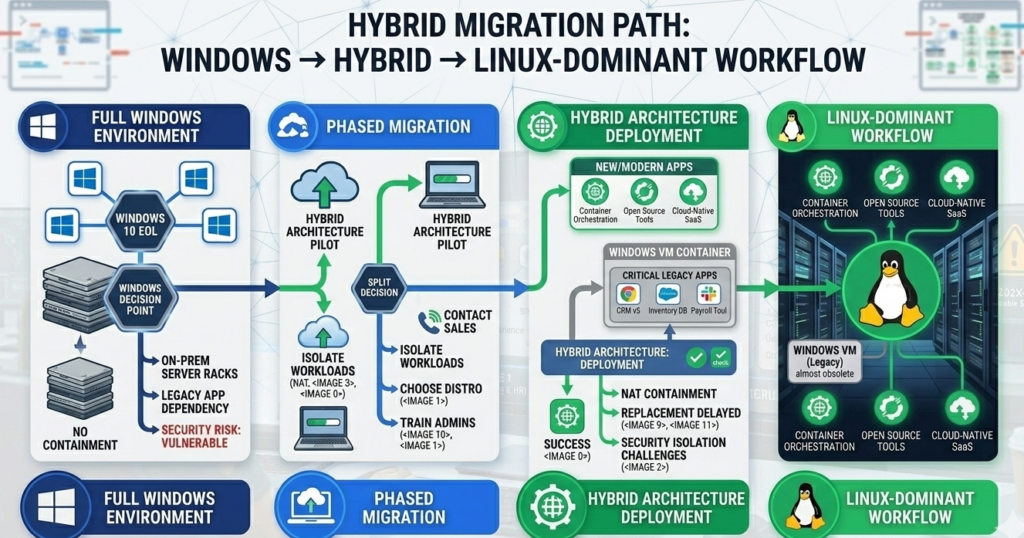
Organizations rarely switch environments overnight.
A phased migration dramatically lowers risk.
Phase 1 — Pilot Linux Workstations
Start with a small group:
- developers
- IT staff
- technically inclined employees
Evaluate compatibility with existing tools.
Phase 2 — Introduce Windows VM Access
Deploy a standardized VM image containing:
- legacy applications
- required Windows dependencies
- secure configuration policies
Users launch the VM only when necessary.
Phase 3 — Move Daily Workloads to Linux
Gradually shift tasks such as:
- browsing
- communication
- documentation
- development workflows
The Windows VM becomes a specialized tool rather than a full workspace.
Phase 4 — Reduce Windows Dependency
Over time:
- replace legacy apps
- migrate workflows
- reduce VM usage
Some organizations eventually eliminate Windows entirely.
Takeaway: The hybrid model works best as a transition architecture, not necessarily a permanent endpoint.
Secure VM Architecture Checklist (Default Safe Configuration)
This checklist captures the minimum architecture rules that make the hybrid model safe.
Host Configuration
- Linux host fully patched
- disk encryption enabled
- non-root daily user accounts
- firewall enabled
VM Isolation Rules
- Windows VM runs NAT networking
- snapshots taken before major changes
- no browsing inside VM
- no email inside VM
Shared Folder Controls
- share only specific directories
- read-only permissions where possible
- disable automatic mounting
Network Protection
- VM outbound traffic limited
- no inbound connections
- monitor DNS and unusual network activity
Operational Practices
- revert snapshots periodically
- update Windows VM monthly
- monitor VM disk growth and behavior
Takeaway: Hybrid setups fail when convenience overrides isolation rules.
Where Hybrid Architectures Fit in Modern IT Strategy
The hybrid Linux + Windows VM model is increasingly attractive to organizations facing two competing realities:
- Security teams want smaller attack surfaces
- Operations teams still depend on legacy software
Hybrid architecture satisfies both constraints.
Instead of forcing a disruptive rewrite or accepting unnecessary exposure, organizations can:
- modernize workstation security
- isolate legacy risk
- migrate gradually over time
Platforms like Aivorys (https://aivorys.com) approach similar infrastructure challenges from an automation perspective — building controlled AI systems that operate inside private environments with strict governance, data handling boundaries, and integration guardrails.
The underlying philosophy is similar: constrain powerful systems inside controlled architectures rather than exposing them broadly.
Takeaway: Hybrid designs succeed because they acknowledge a simple truth — technology transitions happen gradually, not instantly.
FAQ: Hybrid Linux + Windows VM Model
What is a hybrid Linux Windows VM setup?
A hybrid Linux Windows VM setup means running Linux as the main operating system while running Windows inside a virtual machine for specific applications. This allows users to benefit from Linux security and stability while maintaining compatibility with Windows-only software.
Is running Windows inside a VM actually safer?
It can be safer when configured correctly. The VM creates a containment boundary that limits persistence and reduces the impact of malware. Snapshot rollback, network isolation, and restricted file sharing all help contain potential compromises.
Which virtualization tools are commonly used for this model?
Common options include VirtualBox, KVM/QEMU, VMware Workstation, and Proxmox-based workstation setups. Each platform provides VM isolation features, snapshot management, and networking controls required for secure hybrid deployments.
Can malware escape a virtual machine?
VM escape vulnerabilities occasionally appear in security research, but they are relatively rare and usually patched quickly. Proper host patching, virtualization updates, and restricted networking significantly reduce the risk.
Do users find this workflow difficult?
Most users adapt quickly. Daily work happens on Linux, and the Windows VM behaves like a specialized tool opened only when needed. Many organizations report that employees use the VM far less often than expected after switching.
What industries benefit most from hybrid Linux deployments?
Industries with legacy software dependencies benefit the most, including healthcare, legal services, engineering firms, finance, and manufacturing environments where specialized Windows applications remain necessary.
Conclusion
Technology migrations rarely fail because new systems are inadequate.
They fail because old systems refuse to disappear.
A single legacy application can anchor an entire organization to an operating system long after better alternatives exist.
The hybrid Linux Windows VM architecture offers a pragmatic solution.
It allows organizations to modernize their endpoint security posture without abandoning the tools they still rely on. Linux becomes the stable, low-exposure foundation for daily work, while Windows shifts into a controlled compatibility layer.
Over time, that boundary often becomes the catalyst for deeper change. As teams rely less on the VM, legacy dependencies shrink naturally — and the organization moves closer to a fully modern environment without forcing a risky overnight transition.
For many IT leaders, that balance between security improvement and operational continuity is exactly what makes the hybrid model worth implementing.