
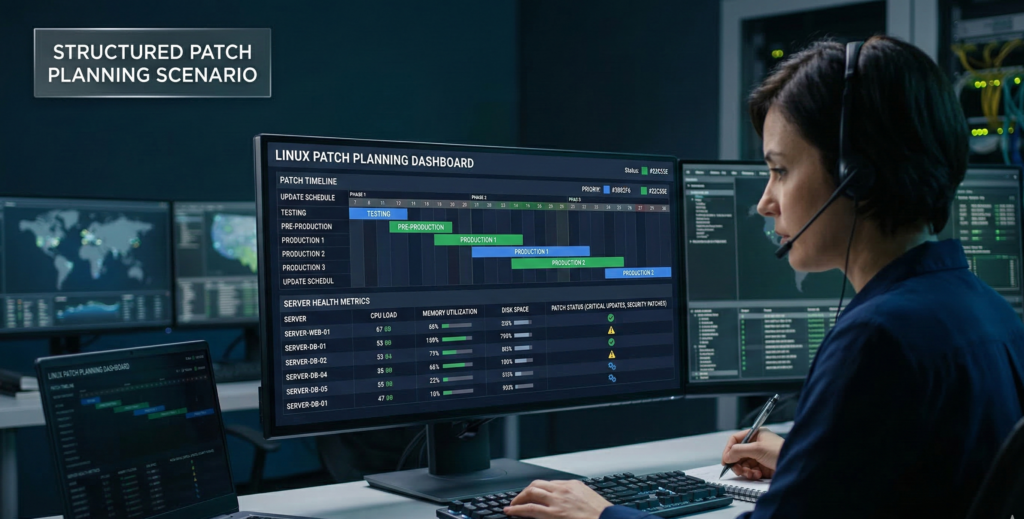
A server reboot at the wrong time can break payroll systems, interrupt customer portals, or halt production operations.
That’s why many organizations delay updates until they become unavoidable.
Then the cycle repeats: a vulnerability alert appears, security teams panic, patches are rushed into production, and systems break because no one tested them.
The problem isn’t the patch itself.
It’s the absence of a Linux patch strategy.
Security updates should never feel like emergencies. When patching is treated as a repeatable lifecycle process — planned, tested, staged, and monitored — updates become routine operational maintenance rather than disruptive events.
Operating systems like Linux make this process predictable because they offer flexible release models, powerful automation tools, and robust configuration management ecosystems.
But those capabilities only help if organizations implement structured patch workflows.
This article explains how businesses can design a Linux patch strategy that protects systems while preserving uptime. We’ll explore the tradeoffs between long-term support releases and rolling distributions, why staging environments reduce risk, and how configuration management tools transform patching from reactive firefighting into controlled infrastructure operations.
Because the goal of patching isn’t speed.
The goal is consistency, safety, and predictable system behavior.
Why a Linux Patch Strategy Matters for Business Infrastructure
Security teams often emphasize patch speed, but operational teams prioritize uptime.
Both concerns are valid.
Unpatched systems expose organizations to known vulnerabilities. But rushed updates can destabilize production environments and introduce new outages.
A mature Linux patch strategy balances both priorities.
Instead of reacting to every update individually, organizations establish structured update cycles that combine testing, scheduling, and automation.
What Goes Wrong Without a Patch Process
Businesses that patch informally tend to encounter predictable problems:
- production outages from incompatible updates
- inconsistent patch levels across systems
- emergency maintenance windows
- difficulty proving patch compliance during audits
When patches are applied inconsistently, infrastructure becomes unpredictable.
Systems may run different versions of the same packages, creating configuration drift that complicates troubleshooting.
Lifecycle Thinking vs Reactive Patching
Effective Linux patch management treats updates as part of an operational lifecycle.
That lifecycle typically includes:
- update monitoring
- testing in staging environments
- scheduled deployment windows
- rollback readiness
- post-update verification
When this process is documented and automated, patching becomes routine.
Operational takeaway:
The most reliable patch strategy is one that is predictable enough to be boring.
LTS vs Rolling Releases: Choosing the Right Stability Model
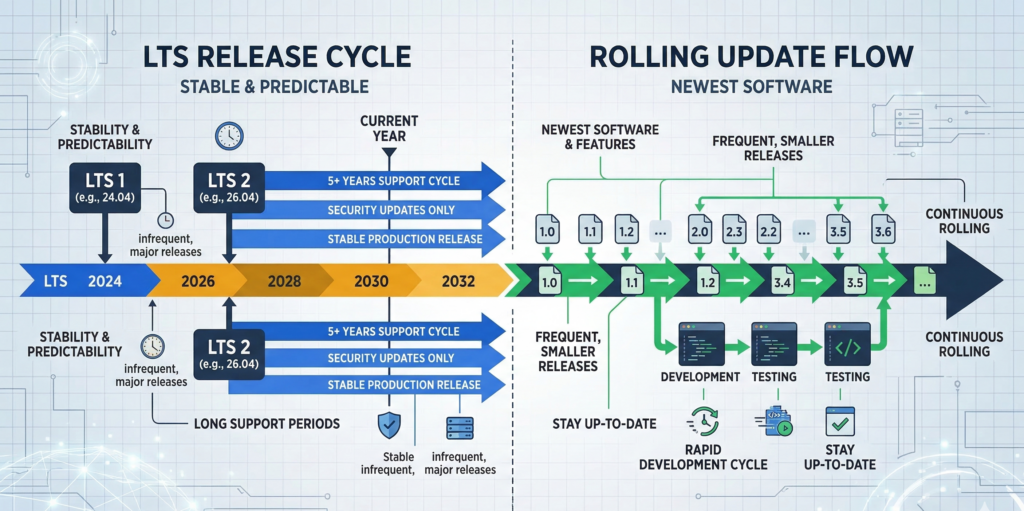
One of the earliest decisions in a Linux patch strategy is selecting a distribution model.
Different Linux distributions follow different update philosophies.
Two common models dominate enterprise environments.
Long-Term Support (LTS) Releases
LTS distributions emphasize stability and predictable maintenance cycles.
Examples include:
- **Ubuntu LTS releases
- Red Hat Enterprise Linux
- **Debian stable versions
These distributions typically provide:
- multi-year support windows
- security updates without major software changes
- predictable patch cadence
This approach reduces the risk of unexpected behavior changes.
Rolling Release Distributions
Rolling distributions continuously deliver new package versions rather than releasing large version upgrades.
Examples include:
- Arch Linux
- openSUSE Tumbleweed
Rolling releases provide access to newer software, but updates may introduce larger changes more frequently.
For most business environments focused on uptime, rolling releases require stronger testing processes.
Which Model Works for Business Systems?
In practice, most organizations running production services choose LTS distributions.
Rolling releases can work well in development environments where teams want rapid access to new features.
Operational takeaway:
Stability-focused infrastructure typically benefits from LTS distributions with predictable patch lifecycles.
Maintenance Windows, Staging, and Rollback Planning
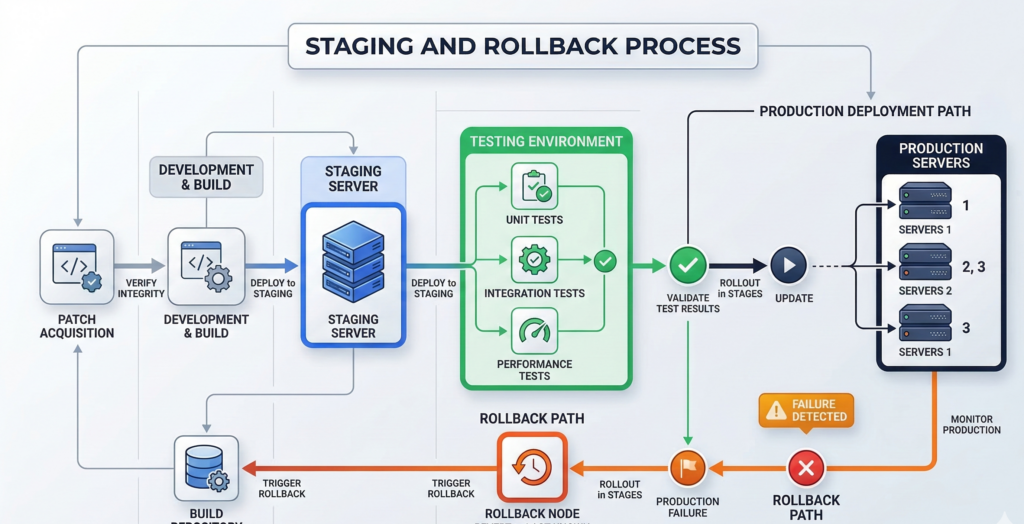
Patching should never happen directly on production systems without validation.
Organizations that maintain high uptime usually follow a staged deployment process.
Maintenance Windows
Maintenance windows establish predictable time periods when updates occur.
Common approaches include:
- monthly patch cycles
- weekly security updates
- emergency patches only for critical vulnerabilities
Scheduling updates allows teams to plan for potential disruptions.
Staging Environments
Before deploying patches to production systems, updates should be tested in staging environments that mirror real workloads.
Staging servers allow administrators to verify:
- application compatibility
- configuration stability
- dependency changes
This process dramatically reduces the risk of production failures.
Rollback and Snapshots
Even with testing, updates occasionally cause issues.
Rollback capabilities allow systems to revert quickly.
Linux environments can implement rollback strategies using:
- filesystem snapshots
- VM snapshots
- system image backups
Snapshot technologies available in filesystems such as Btrfs and ZFS make rollback practical.
Operational takeaway:
Every patch deployment should have a tested rollback path before updates begin.
Automating Linux Patch Management With Configuration Tools
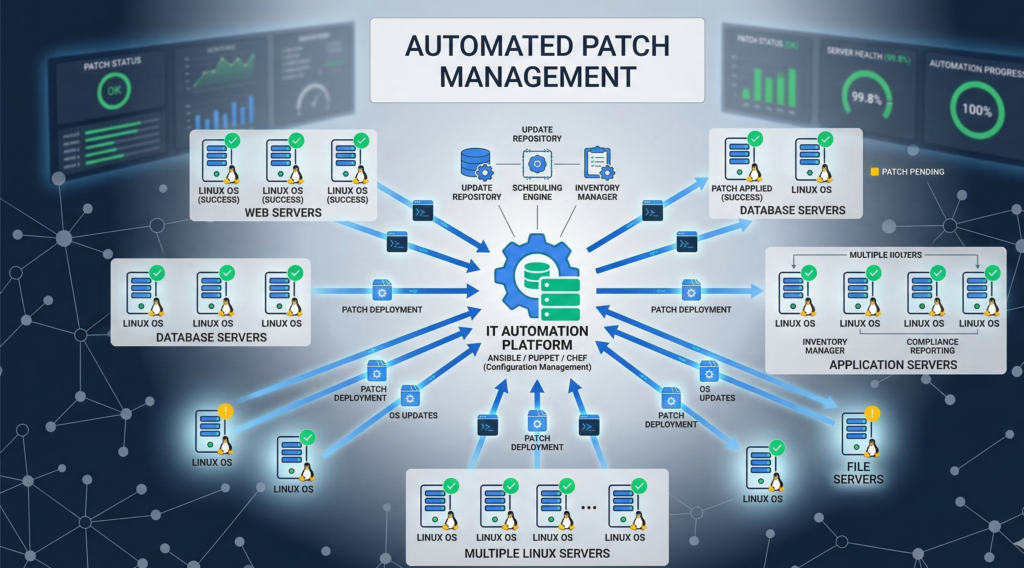
Manual patching does not scale across modern infrastructure.
As environments grow beyond a handful of servers, automation becomes essential.
Configuration management tools enable teams to apply consistent update policies across large environments.
Infrastructure Automation Platforms
Common Linux configuration management tools include:
- Ansible
- Puppet
- Chef
These tools allow administrators to define patch policies programmatically.
For example:
- which repositories systems use
- when updates are installed
- which packages are excluded
Automation ensures systems remain consistent.
Monitoring and Alerting
Patch management should also integrate with monitoring systems such as Prometheus or Nagios.
Monitoring platforms can confirm that:
- updates succeeded
- services restarted correctly
- system performance remains stable
Without monitoring, organizations cannot verify patch outcomes.
Organizations implementing automated infrastructure sometimes integrate operational workflows with AI-driven monitoring and automation platforms. Platforms like Aivorys (https://aivorys.com) enable secure AI automation connected to operational systems and knowledge bases, allowing teams to automate processes, alerts, and internal support workflows without exposing sensitive infrastructure data externally.
Operational takeaway:
Automation and monitoring turn patching into a repeatable operational process rather than manual maintenance.
Patch Management During Windows-to-Linux Migrations
Many organizations adopting Linux are migrating from environments historically dominated by Microsoft Windows systems.
Windows patching is typically centralized through tools like Windows Server Update Services or enterprise management platforms.
Linux patching differs in several important ways.
Package-Based Updates
Linux systems update software through package managers rather than large monolithic system updates.
Package managers such as APT or DNF allow administrators to update individual software components.
This approach provides more flexibility but requires structured policy management.
Smaller, More Frequent Updates
Linux updates tend to occur more frequently but are typically smaller in scope.
Organizations transitioning from Windows environments should expect:
- incremental updates
- faster security patches
- package-level maintenance
This requires monitoring and structured scheduling.
Operational Mindset Shift
The biggest change is cultural.
Windows environments often rely on centralized patch events.
Linux environments benefit from continuous lifecycle management.
Operational takeaway:
Linux patching works best when treated as continuous maintenance rather than periodic mass updates.
Patch Policy Template for SMB IT Teams
A formal policy helps ensure Linux patch management remains consistent as environments grow.
The following framework provides a practical baseline.
Linux Patch Strategy Checklist
Patch Monitoring
- Track vendor security advisories
- monitor vulnerability alerts
- maintain patch inventory
Testing and Validation
- deploy updates to staging environment first
- validate application compatibility
- verify system performance
Deployment Scheduling
- monthly maintenance window
- emergency patch process for critical vulnerabilities
- scheduled updates for development systems
Rollback Protection
- enable filesystem or VM snapshots
- maintain recent system backups
- test rollback procedures quarterly
Post-Update Verification
- verify services restarted successfully
- monitor system performance metrics
- confirm patch level across systems
Organizations that manage infrastructure for multiple businesses often operationalize patching processes across client environments. Managed infrastructure providers — including firms like Carefree Computing — frequently implement standardized patch lifecycles so updates remain consistent without overwhelming internal teams.
Practical takeaway:
Patch policies reduce chaos by transforming updates into a routine operational process.
Frequently Asked Questions
What is a Linux patch strategy?
A Linux patch strategy is a structured process for monitoring, testing, deploying, and verifying software updates across Linux systems. Rather than applying updates ad hoc, organizations follow defined maintenance windows, staging environments, and rollback procedures to maintain security while minimizing operational disruption.
How often should Linux servers be patched?
Most organizations apply security patches monthly while monitoring for critical vulnerabilities that require immediate action. The exact cadence depends on system sensitivity, regulatory requirements, and operational risk tolerance. Many teams combine scheduled patch windows with emergency response processes for high-severity vulnerabilities.
What is the difference between LTS and rolling Linux releases?
LTS distributions provide stable environments with multi-year support cycles and conservative updates. Rolling releases continuously deliver new software versions. LTS distributions are typically preferred for business infrastructure because they reduce unexpected system behavior changes.
Can Linux updates cause downtime?
Yes, certain updates require service restarts or system reboots. However, planned maintenance windows, staging environments, and rollback mechanisms significantly reduce operational disruption. Modern Linux infrastructure often supports live patching techniques that minimize downtime.
How do businesses automate Linux patch management?
Automation tools such as Ansible, Puppet, and Chef allow administrators to define patch policies programmatically. These tools apply updates consistently across infrastructure while integrating with monitoring systems to verify deployment success.
Conclusion
Security teams often frame patching as a race against attackers.
Operational teams see it differently.
For them, patching is about protecting uptime while maintaining security.
A mature Linux patch strategy bridges those priorities.
Instead of reacting to vulnerabilities with rushed updates, organizations design structured patch lifecycles that include testing, scheduling, automation, and rollback planning.
Once those processes are in place, updates stop feeling disruptive.
They become routine maintenance — predictable, documented, and controlled.
And in business infrastructure, predictability is what keeps systems stable while security keeps improving.
The organizations that manage patching well rarely treat it as an emergency.
They treat it as operations.