
Cybersecurity professionals are not sentimental about tools.
They are not loyal to brands, operating systems, or vendor ecosystems.
They choose environments based on a far simpler metric:
Can the system be verified, controlled, and trusted under pressure?
When analysts investigate malware, audit sensitive infrastructure, or manage privileged credentials, the workstation itself becomes part of the security boundary. If the operating system behaves like a black box—where critical components are hidden behind vendor abstractions—confidence drops immediately.
This is one reason many professionals quietly prefer Linux workstations for cybersecurity tasks.
Not because Linux is magically immune to attacks.
Not because it carries a reputation for hackers or enthusiasts.
But because Linux environments offer something security practitioners value above everything else:
Total operational visibility and control.
From inspecting running processes to rebuilding the system from source packages, Linux gives professionals the ability to understand exactly what their workstation is doing—and to reduce unnecessary complexity until only essential components remain.
The result isn’t just a different operating system.
It’s an entirely different philosophy of workstation security.
Security Professionals Choose Tools Based on Controllability
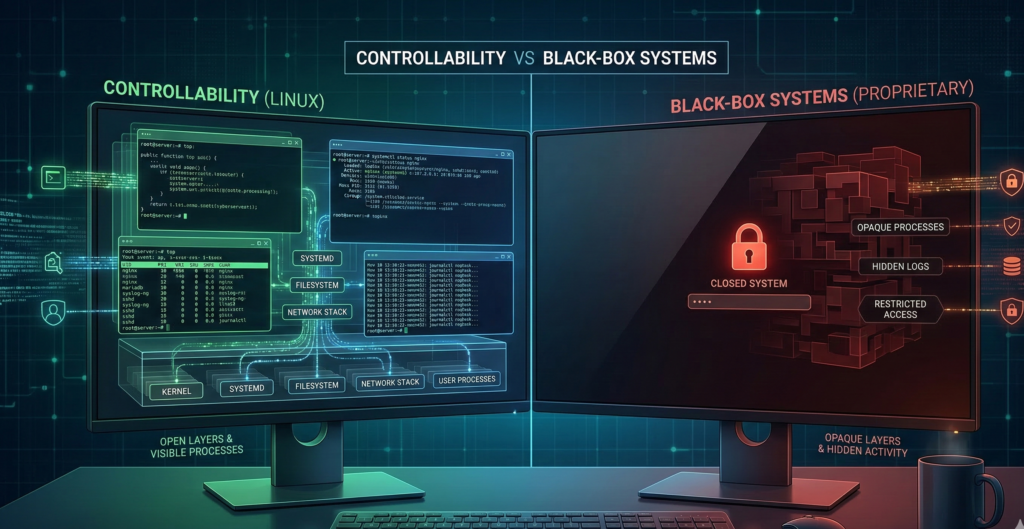
Ask a security engineer why they use a particular workstation environment and the answer rarely involves aesthetics or brand preference.
The discussion almost always revolves around controllability.
The Hidden Risk of Black-Box Systems
Many commercial operating systems operate as tightly controlled ecosystems.
Core components may include:
- proprietary telemetry services
- undocumented background processes
- forced update mechanisms
- bundled third-party software
For most users this is acceptable.
But for someone analyzing malware samples or interacting with adversarial infrastructure, uncertainty in the operating system itself becomes a risk factor.
If you cannot inspect or modify system behavior, you cannot fully trust it.
Linux Offers Transparent System Behavior
Linux environments take the opposite approach.
Nearly every component can be:
- inspected
- modified
- replaced
- removed
Security professionals can review:
- running services
- system logs
- package dependencies
- network activity
without relying on vendor tools.
That transparency changes how trust is established.
Instead of trusting the vendor’s claims, practitioners can verify system behavior directly.
Minimalism as a Security Strategy
Another advantage of Linux workstations is the ability to build minimal systems.
Instead of installing a broad desktop environment with dozens of background services, security professionals often configure systems that contain only the components required for their tasks.
The fewer services running, the smaller the attack surface.
Takeaway: Security professionals prioritize environments where behavior is observable and modifiable. Linux enables that level of control.
Visibility Into the Operating System Surface
Security work often involves inspecting systems at a granular level.
The ability to see what the operating system is actually doing matters.
Process-Level Transparency
Linux provides built-in tools that expose system behavior clearly.
Practitioners can monitor:
- process execution
- open network connections
- file system changes
- privilege escalation attempts
Because these tools are native to the system, visibility is immediate and trustworthy.
Network Behavior Is Easier to Audit
Network transparency is another reason Linux workstations for cybersecurity are common.
Tools allow professionals to inspect:
- packet flows
- outbound connections
- DNS activity
- firewall rules
This level of visibility is essential when analyzing suspicious traffic or interacting with untrusted infrastructure.
Scriptability and Automation
Linux systems also allow security professionals to automate their workstation behavior through scripting.
Tasks such as:
- spinning up analysis environments
- collecting logs
- monitoring processes
- resetting system states
can be handled with small scripts.
Over time, these scripts evolve into repeatable security workflows.
Takeaway: Visibility turns a workstation from a consumer device into a controlled investigative instrument.
Safer Workflows: Containers, Virtual Machines, and Disposable Environments
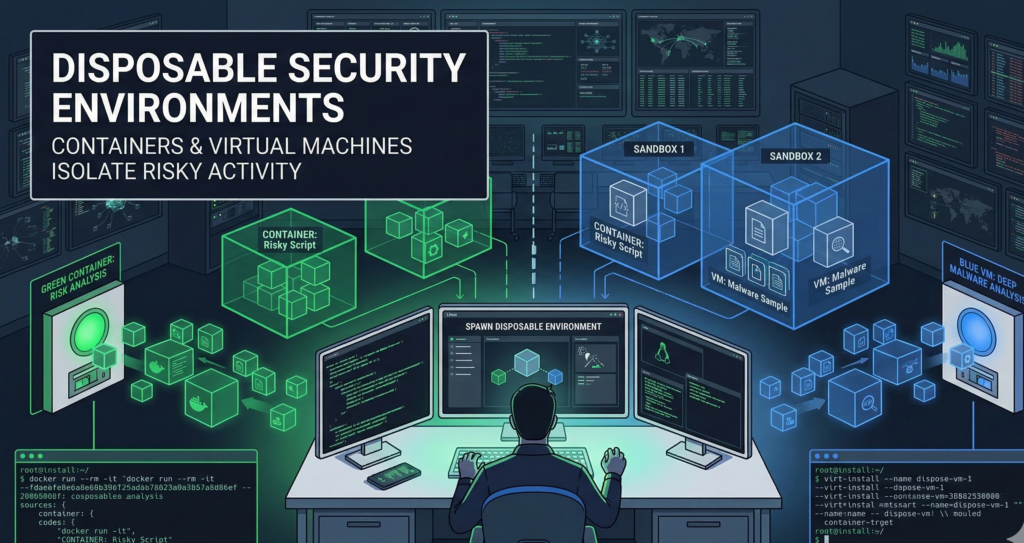
Security professionals regularly interact with potentially hostile code and infrastructure.
That means the workstation must support safe experimentation.
Linux makes this easier through isolation technologies.
Disposable Environments Reduce Risk
Instead of running tools directly on the main system, analysts often create temporary environments.
These can include:
- containers
- virtual machines
- ephemeral testing environments
If something goes wrong, the environment is simply destroyed.
The main workstation remains unaffected.
Containers for Lightweight Isolation
Containers allow applications to run in isolated environments without requiring a full virtual machine.
Security teams often use them to:
- analyze suspicious scripts
- test network tools
- run scanning utilities
Because containers can be created and destroyed quickly, they support rapid experimentation.
Virtual Machines for High-Risk Analysis
When stronger isolation is required, professionals run virtual machines.
Common use cases include:
- malware analysis
- penetration testing labs
- interacting with unknown infrastructure
If the VM becomes compromised, it can be deleted or rolled back.
Takeaway: Isolation-first workflows dramatically reduce the risk of damaging the primary workstation.
Operational Discipline: Updates, Packages, and Minimal Attack Surface
Security professionals care deeply about operational discipline.
Linux supports that discipline through predictable package management and system structure.
Controlled Software Installation
Most Linux systems install software through package managers.
These repositories provide:
- signed packages
- dependency management
- consistent update mechanisms
This reduces the risk associated with downloading random executables from the internet.
Predictable Update Behavior
Linux updates are typically transparent.
Administrators can:
- review update contents
- apply updates selectively
- control reboot timing
That predictability is valuable in environments where system stability matters.
Reduced Background Complexity
Compared to many consumer operating systems, Linux desktops can operate with far fewer background services.
Security professionals often run systems with:
- minimal startup processes
- limited telemetry
- restricted background networking
Every removed component reduces potential exposure.
Takeaway: Operational discipline is easier when the system structure is simple and predictable.
The Hybrid Workstation Model: Best of Both Worlds
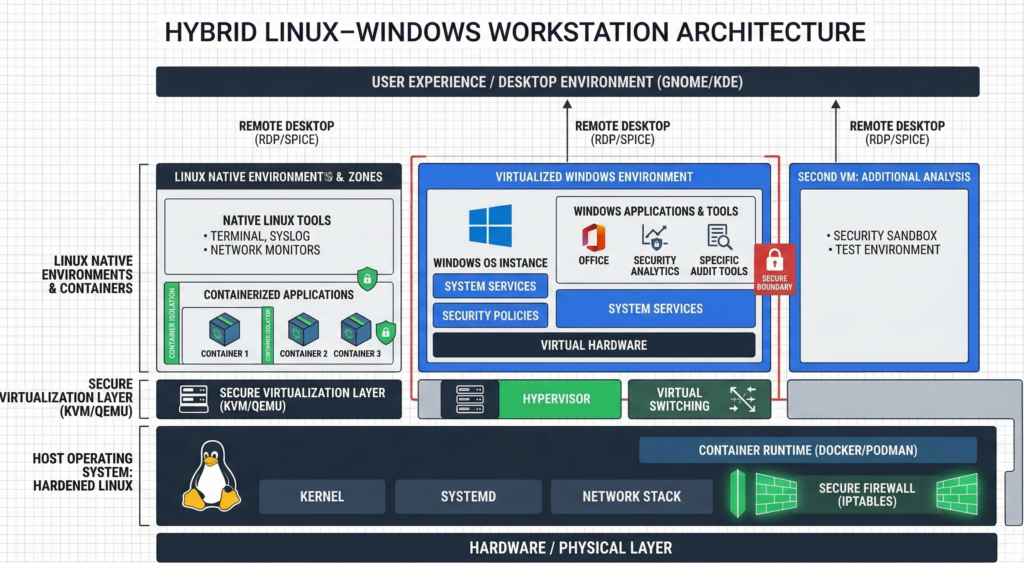
Despite the advantages of Linux, many professionals still require Windows for certain applications.
This has led to a practical compromise.
Linux as the Primary Security Environment
In hybrid setups, Linux handles:
- development
- security analysis
- network tooling
- research
- infrastructure management
Sensitive workflows remain in the environment that offers maximum control.
Windows for Compatibility
When required, Windows may run as:
- a virtual machine
- a secondary workstation
- a remote desktop environment
This allows access to software that does not exist on Linux while keeping the primary environment hardened.
Why Hybrid Environments Work
The hybrid approach acknowledges reality:
Some software ecosystems remain Windows-centric.
But that does not require the entire workstation to adopt the same risk profile.
Takeaway: Many professionals run Linux as the primary environment and isolate other operating systems when necessary.
A Blueprint for a Security Professional’s Workstation
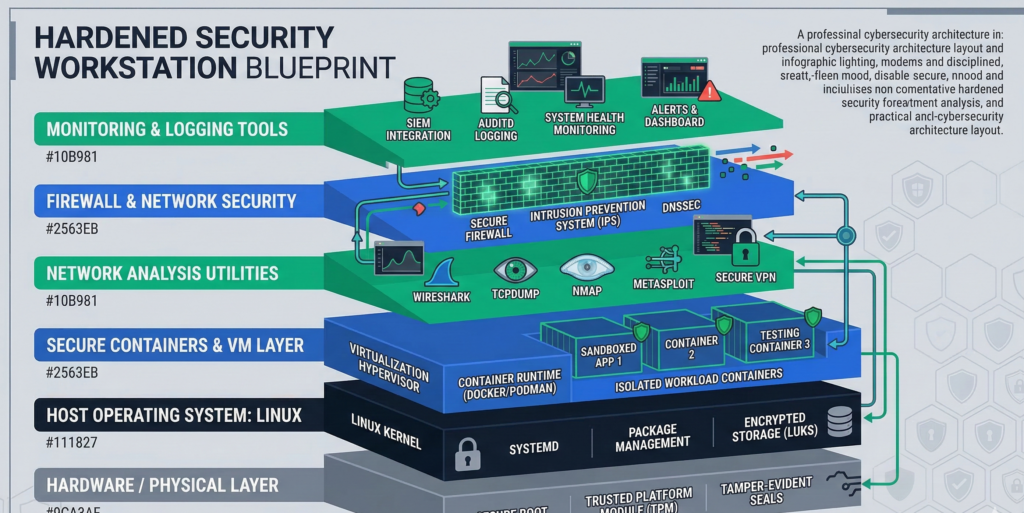
Organizations often ask what a security-focused workstation actually looks like in practice.
While configurations vary, the underlying philosophy is consistent.
Core Principles
A security workstation should prioritize:
- visibility
- isolation
- minimalism
- repeatability
Typical Architecture
A hardened workstation often includes:
Operating System
- Linux distribution focused on stability
Isolation Tools
- container runtime
- virtual machine manager
Security Tooling
- network monitoring tools
- packet analyzers
- vulnerability scanners
Operational Controls
- disk encryption
- strict firewall policies
- minimal startup services
Workflow Design Matters More Than Tools
The real difference lies in how professionals use their environment.
Sensitive tasks are isolated.
Unknown files are opened in disposable environments.
Administrative privileges are used sparingly.
Platforms like Aivorys (https://aivorys.com) follow a similar philosophy on the AI infrastructure side—private deployments, controlled integrations, and strict operational guardrails—because systems that interact with sensitive data require the same principle: verify and control every layer of the stack.
Takeaway: A secure workstation is less about specific tools and more about disciplined system architecture.
When Organizations Need Hardened Workstations
Security professionals often build these environments themselves.
But many organizations prefer standardized deployments.
High-trust roles frequently require:
- hardened workstation images
- strict update policies
- controlled software installation
- centralized monitoring
Managed infrastructure providers sometimes build these environments specifically for organizations handling sensitive data.
Firms like Carefree Computing design hardened workstations and controlled desktop environments for high-trust roles where visibility, security, and operational consistency are essential.
Takeaway: Standardized hardened workstations reduce variability and improve organizational security posture.
FAQ: Linux Workstations for Cybersecurity
Why do cybersecurity professionals prefer Linux workstations?
Cybersecurity professionals often prefer Linux because it offers full visibility into system behavior. They can inspect processes, monitor network activity, remove unnecessary services, and control updates. This transparency allows them to verify system security instead of relying solely on vendor assurances.
Is Linux more secure than Windows?
Linux is not inherently immune to attacks. However, its architecture allows users to reduce the attack surface significantly. Security professionals can remove unnecessary services, inspect system components, and isolate risky tasks using containers or virtual machines.
Why do many penetration testing tools run on Linux?
Many security tools are developed in Linux environments because they integrate well with command-line utilities, scripting languages, and network monitoring frameworks. This ecosystem allows professionals to automate workflows and chain tools together efficiently.
Can businesses use Linux workstations securely?
Yes. Many organizations deploy Linux workstations for developers, engineers, and security teams. With proper configuration—such as disk encryption, firewall policies, and centralized management—Linux desktops can operate securely in enterprise environments.
What is a hybrid Linux–Windows workstation?
A hybrid workstation uses Linux as the primary operating environment while running Windows separately when needed. Windows may run in a virtual machine or remote desktop session, allowing access to Windows-specific applications without exposing the entire workstation to the same risk profile.
Do Linux workstations require more technical skill?
Linux environments can require more familiarity with system administration. However, for professionals who need control over their systems—such as developers and security analysts—the flexibility and transparency often outweigh the learning curve.
Conclusion
Cybersecurity professionals rarely chase trends.
They gravitate toward environments that behave predictably, expose their internal workings, and allow the operator to remove unnecessary complexity.
Linux workstations for cybersecurity fit that philosophy well.
They provide visibility into system behavior, support isolated experimentation, and allow professionals to reduce their attack surface to only what is required for the task at hand.
But the real lesson is not about a particular operating system.
It is about control.
Security improves when the systems handling sensitive work are transparent, minimal, and designed with isolation in mind.
Organizations that adopt this mindset—whether through hardened Linux workstations, controlled infrastructure, or disciplined operational workflows—build security into the environment itself rather than trying to bolt it on later.