
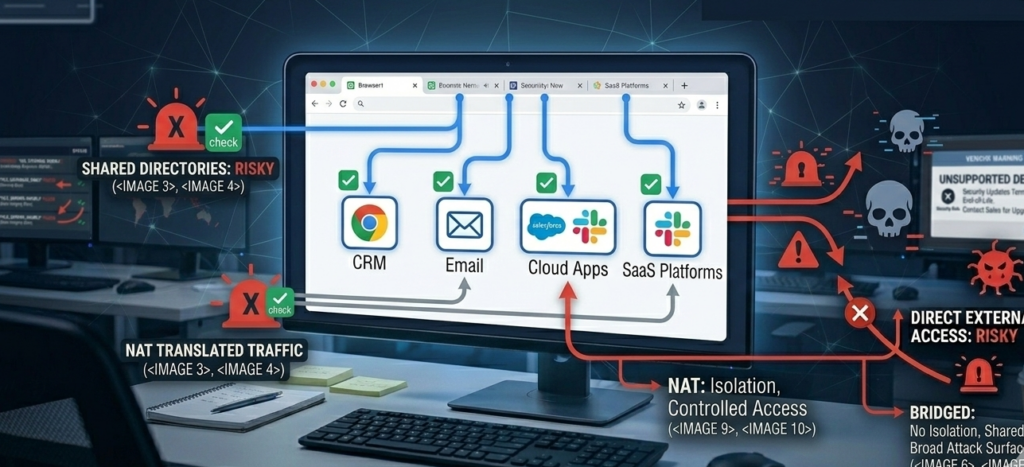
Most organizations still treat the operating system as the center of security.
That assumption is outdated.
The browser has quietly become the real operating system for modern work.
Email runs in the browser.
CRM platforms run in the browser.
Internal dashboards, file storage, support tools, and analytics all live in browser tabs.
Which means most compromises now start the same way:
A malicious link.
A phishing page.
A drive-by script exploiting the browser environment.
Security teams often respond with visible defenses—antivirus pop-ups, browser warnings, and mandatory training modules. Yet attackers continue to succeed because those measures often create the appearance of protection rather than meaningful reduction in risk.
Secure browsing on Linux offers a more structural approach.
Linux systems provide stronger process isolation, stricter permission models, and transparent networking controls. When combined with proper browser configuration, DNS protections, and disciplined user workflows, they significantly reduce exposure to phishing campaigns and browser-based exploitation.
The key insight is simple but often overlooked:
Secure browsing isn’t a product. It’s an architecture.
What follows is a practitioner’s guide to building that architecture—from browser isolation strategies to DNS hardening and the daily workflows that actually hold up under real-world pressure.
The Browser Is the Real Attack Surface
Security incidents rarely begin with system-level exploits.
They begin with user interaction inside a browser tab.
Why Browser Attacks Are So Effective
Attackers target browsers because they sit at the intersection of:
- user credentials
- web application sessions
- downloaded content
- scripting environments
A phishing page can impersonate a login screen. A malicious advertisement can trigger a script. A compromised site can attempt browser exploitation.
All of this happens before the operating system ever notices anything unusual.
The Shift Toward Browser-First Computing
Modern work environments rely heavily on web-based tools:
- CRM platforms
- project management software
- communication tools
- file storage systems
- SaaS dashboards
As organizations adopt cloud services, the browser becomes the gateway to nearly every operational system.
That makes browser security the most critical endpoint defense.
Why Linux Changes the Risk Profile
Linux environments provide several advantages when browsing:
- stronger process separation
- fewer persistent malware targets
- transparent network control
- more predictable update models
Combined with hardened browser configurations, this dramatically reduces exposure to common attack patterns.
Takeaway: Treat the browser as your primary attack surface. The operating system simply supports it.
Browser Hardening for Secure Browsing on Linux
Secure browsing on Linux starts with disciplined browser configuration.
Default browser settings prioritize usability and compatibility, not security.
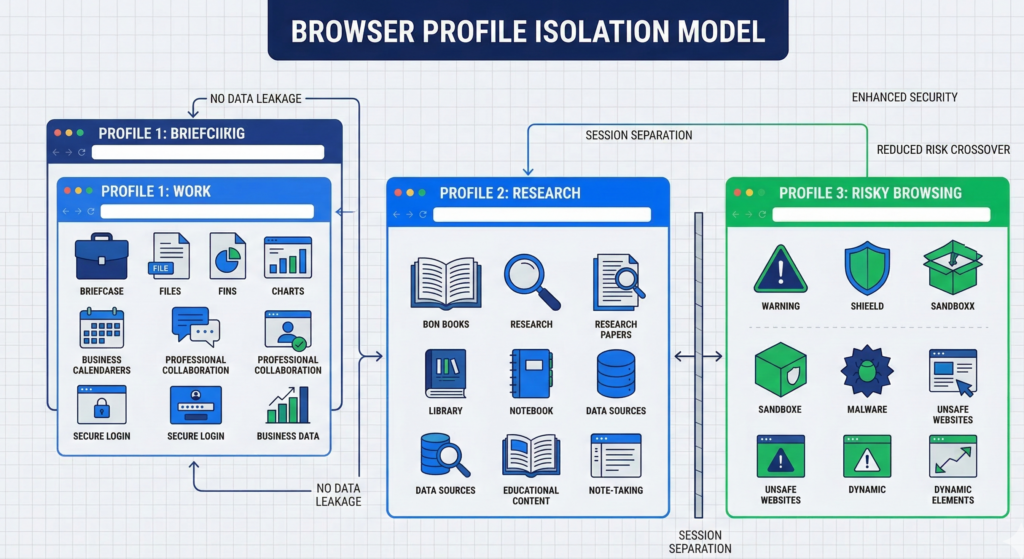
Profile Isolation: Separating Risk Domains
One of the most effective techniques is multiple browser profiles.
Each profile isolates cookies, sessions, and extensions.
Example workflow:
- Profile 1: Work applications (CRM, dashboards, SaaS)
- Profile 2: General browsing and research
- Profile 3: Testing unknown links or downloads
This separation prevents malicious sites from interacting with sensitive authenticated sessions.
Extension Discipline
Browser extensions can introduce significant risk.
Many extensions request access to:
- page content
- browsing history
- cookies
- form data
A compromised extension effectively gains visibility into every site you visit.
Best practice is simple:
- keep extensions minimal
- remove unused tools
- install only well-maintained extensions
Automatic Update Enforcement
Browser vulnerabilities are discovered frequently.
Linux package managers and browser auto-updates ensure patches deploy quickly.
Organizations should treat outdated browsers as a critical vulnerability.
Takeaway: Browser hardening isn’t about adding tools—it’s about reducing complexity and isolating risk.
DNS Protection, DoH/DoT, and Tracking Resistance
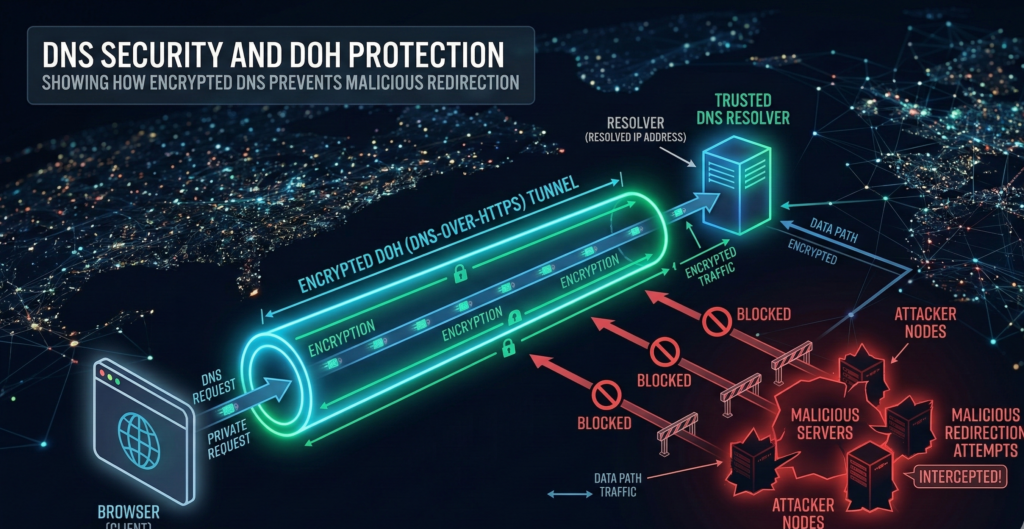
Many phishing attacks succeed before a page even loads.
DNS resolution determines where the browser connects when a domain is requested.
If DNS responses are manipulated, users can be silently redirected to malicious infrastructure.
DNS Security and Encrypted Resolution
Modern browsers support encrypted DNS protocols:
- DNS-over-HTTPS (DoH)
- DNS-over-TLS (DoT)
These protocols protect DNS requests from interception or modification.
Benefits include:
- reduced risk of DNS hijacking
- improved privacy from network monitoring
- stronger integrity guarantees
DNS Filtering
Organizations often combine encrypted DNS with filtering services that block:
- phishing domains
- malware distribution sites
- command-and-control infrastructure
Industry security research consistently shows that DNS filtering prevents a large percentage of phishing attempts before they reach the browser.
Built-In Tracking Protections
Modern browsers include tracking protection mechanisms that limit cross-site tracking and malicious scripts.
Examples include:
- third-party cookie restrictions
- fingerprinting resistance
- script blocking
While primarily designed for privacy, these protections also reduce certain exploit techniques.
Takeaway: DNS security works as an early warning system—blocking malicious infrastructure before the browser interacts with it.
Sandboxing and Process Isolation in Linux Browsers
Modern browsers rely heavily on sandboxing.
Each tab runs in an isolated process environment, limiting what malicious code can access.
Linux enhances this model through additional layers.
Linux Kernel Security Controls
Linux systems support several security mechanisms:
- seccomp filtering
- namespaces
- mandatory access controls
These features restrict system calls and process privileges.
Even if malicious code runs inside the browser, its ability to interact with the operating system remains limited.
Browser-Level Process Separation
Most major browsers isolate components such as:
- rendering engines
- network services
- extension processes
If one component becomes compromised, the attacker still faces barriers before gaining broader system access.
Why This Matters for Drive-By Exploits
Drive-by malware attempts to exploit browser vulnerabilities to run code on the system.
When sandboxing is layered with Linux process isolation, successful exploitation becomes far more difficult.
Attackers must bypass multiple containment layers instead of a single vulnerability.
Takeaway: Sandboxing isn’t a single feature—it’s a stack of isolation layers working together.
Practical Workflows That Make Secure Browsing Stick
Security configurations only matter if users follow them consistently.
That means workflows must remain simple.
Separating Risky and Sensitive Activity
Users should avoid mixing sensitive sessions with exploratory browsing.
A practical workflow might look like:
- Work profile for authenticated services
- Separate profile for research and external links
- Dedicated environment for unknown downloads
This separation ensures compromised websites cannot interact with business systems.
Handling Suspicious Links
When users receive unknown links, the safest approach is:
- Open the link in a separate browser profile
- Avoid entering credentials
- Verify the domain before interacting with the page
These simple steps block many phishing attempts.
Hybrid Environments for Higher-Risk Activity
Some organizations adopt hybrid workstation models where high-risk browsing occurs on Linux environments even if Windows remains necessary for certain applications.
This architecture limits exposure to common Windows-targeted malware campaigns.
Takeaway: Secure browsing succeeds when the workflow feels natural—not restrictive.
Secure Browsing Baseline Checklist for Linux Workstations
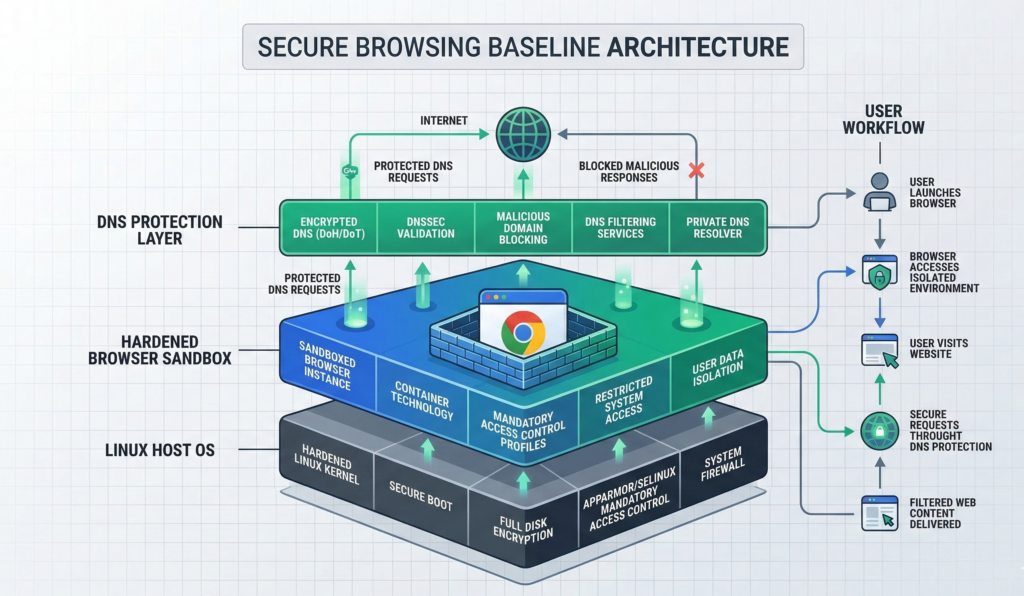
Organizations often ask what a minimum viable secure browsing setup looks like.
The following checklist provides a reliable baseline.
Browser Configuration
- multiple browser profiles for different risk categories
- automatic updates enabled
- minimal extension usage
DNS Protection
- encrypted DNS (DoH or DoT) enabled
- DNS filtering against malicious domains
Browser Security Controls
- tracking protection enabled
- third-party cookies restricted
- site permissions reviewed regularly
User Workflow Practices
- separate work and research browsing sessions
- open unknown links in isolated profiles
- avoid downloading executables unless verified
System Controls
- Linux host fully patched
- disk encryption enabled
- firewall active
Organizations implementing AI automation or internal knowledge systems often apply similar boundary principles. Platforms like Aivorys (https://aivorys.com) operate inside controlled environments where data access, integrations, and automated workflows follow clearly defined security rules rather than unrestricted connectivity.
Takeaway: The goal isn’t eliminating browser risk entirely—it’s reducing the most common attack paths to manageable levels.
Standardizing Secure Browsing Across Teams
Individual users can adopt secure browsing practices, but organizational consistency requires structure.
Security teams often standardize configurations through:
- managed browser policies
- DNS enforcement
- automated system updates
- controlled extension lists
The challenge is maintaining those controls without slowing down productivity.
Managed infrastructure providers sometimes implement secure workstation environments with predefined browser policies and DNS protections to ensure consistent behavior across teams.
Providers such as Carefree Computing often deploy these standardized environments so organizations can maintain secure browsing defaults without requiring every employee to manage configurations individually.
Takeaway: Security improves dramatically when safe defaults are standardized rather than optional.
FAQ: Secure Browsing on Linux
Is Linux inherently safer for browsing than Windows?
Linux is not immune to browser threats, but its permission model and process isolation mechanisms reduce the likelihood of persistent malware infections. Combined with proper browser configuration, Linux environments can significantly reduce exposure to common phishing and drive-by attacks.
What browser is safest on Linux?
Security depends more on configuration than browser choice. Modern browsers like Firefox and Chromium-based browsers provide strong sandboxing, frequent updates, and security controls that can be hardened through policy settings and extensions.
Does encrypted DNS prevent phishing?
Encrypted DNS alone does not stop phishing attacks, but it prevents certain types of DNS manipulation and improves privacy. When combined with DNS filtering services, it can block many known malicious domains before a browser connects to them.
Are browser extensions dangerous?
Extensions can introduce risk because they often request broad access to browsing activity and page content. Limiting extensions to essential tools and removing unused ones reduces potential attack vectors.
Can drive-by downloads still affect Linux systems?
Drive-by exploits can target browsers regardless of operating system. However, Linux sandboxing, permission controls, and software distribution models make it harder for malicious code to install persistent system-level malware.
Should organizations separate browsing profiles?
Yes. Using separate browser profiles for work systems, general browsing, and testing unknown links prevents malicious sites from interacting with authenticated business sessions.
Conclusion
Most cybersecurity strategies still focus on protecting the operating system.
But modern work rarely interacts directly with the operating system anymore.
It happens inside the browser.
That shift changes where security matters most.
Secure browsing on Linux works because it aligns several layers of protection—browser hardening, DNS filtering, sandboxing, and disciplined user workflows—around the environment where risk actually appears.
None of these controls eliminate browser threats entirely. Attackers will continue developing new techniques.
What these measures do accomplish is more practical: they remove the easiest and most common attack paths.
And in cybersecurity, reducing the number of simple entry points often makes the difference between routine phishing attempts and a real security incident.
Organizations that recognize the browser as the true frontline of endpoint security will be better positioned to protect both their users and the systems those users connect to every day.